HR teams are drowning in work that should not require a human: answering the same policy question for the fifteenth time, reformatting CVs, chasing overdue reviews. Generative AI in HR is changing that by automating the administrative layer so that HR professionals can focus on work that actually requires judgment.
This article covers eight real-world examples of AI in HR, the architecture behind them, and what responsible implementation looks like from first pilot to full scale.
Eight core generative AI use cases in HR:
- Talent acquisition and recruitment automation
- Onboarding
- Chatbot for self-service and Q&A
- Performance management
- Learning and development
- Workforce planning and skills forecasting
- HR analytics
- Supporting corporate culture
Why should businesses use generative AI for HR
Let's see what artificial intelligence in HR actually changes for the business and what the benefits of AI in HR are:
- Cost reduction at the department level. Savings come from reduced time-to-hire, lower agency fees when sourcing is automated, and fewer compliance errors that require costly corrections downstream.
- Time recovered from repetitive work. Generative AI in HR can recover a significant portion of HR's workweek on tasks that don't require judgment: answering the same questions, updating records, formatting documents.
- More accurate hiring. Artificial intelligence in HR screens applications against the skills that actually predict success in a role, which results in faster and better decisions.
- Competitive advantage in talent acquisition. Companies that automate sourcing and screening reach qualified candidates days before competitors, which are still processing manually.
- Better employee experience. Role-specific onboarding and instant policy answers show up directly in engagement and retention.
- Earlier warning on workforce risk. AI tracks signals – disengagement, skills gaps, attrition risk – that human managers can't monitor at this scale.
Traditional HR vs AI-powered HR
The shift from one to the other isn't just a technology upgrade – it's a fundamental change in how HR work gets done. Here's what each model actually looks like.
How traditional HR operates
Pre-AI HR wasn't pure paperwork – it had been automating routine work for years already. Applicant tracking systems matched resumes against keyword lists, tools like Workday and SAP ran onboarding on scheduled triggers, basic chatbots answered questions phrased the way the system expected.
The catch: someone had to write a rule for every situation in advance. The moment a case didn't fit – different wording, an unexpected scenario – the system gave up and handed it back to a person.
How AI-powered HR operates
Generative AI in HR skips the script. It reads what a candidate actually wrote instead of matching keywords, looks up the real policy instead of routing to a canned answer, and adjusts onboarding to the person rather than needing a new rule for every hire.
Today, HR software development means combining deep domain knowledge with AI capabilities that didn't exist a few years ago – the result is systems that do things traditional HR tools simply weren't designed to do.
How is AI used in human resources? The use cases below show exactly where that shift shows up in practice and how to use AI in HR.
Core AI use cases in HR: where GenAI delivers the most value
Each of the eight AI in HR examples below follows the same structure: what AI-powered technology can actually do, and a real company that has already done it.
Talent acquisition and recruitment automation
AI in HR recruitment automation changes the hiring workflow day-to-day. When a role opens, AI drafts the job description from the skills that predict success in similar roles. When applications come in, it screens them semantically, surfacing candidates who match on substance rather than keyword overlap.
Once a shortlist is agreed, it schedules interviews and drafts outreach to passive candidates. The hiring manager and recruiter stay in control of every decision; they just spend less time on the work between decisions.
According to SHRM’s survey, 65% of HR professionals already use AI to write job descriptions. That is the entry point. The full potential of AI recruitment automation – end-to-end pipeline automation, semantic matching, outreach at scale – is covered in DigitalSuits’ guide to AI-powered recruiting automation.
In practice: Synsel, a Netherlands-based staffing agency, expanded its active vacancy database by 25% and cut time spent on repetitive tasks by roughly 30% after automating its recruitment workflow end-to-end. DigitalSuits built a RAG-based pipeline that automatically transcribes candidate calls, generates structured CVs, narrows 20,000+ vacancies to the 250 best matches per candidate using semantic search, enriches company contacts, and drafts personalized outreach emails – with the hiring manager stepping in only to review and communicate. See the full breakdown of what was built and how it changed the way the team works in the dedicated section below.
Onboarding
AI onboarding changes the new hire experience from the moment an offer is accepted. The new employee gets a role-specific plan – what to read, who to meet, what to complete and by when – built automatically based on their role, department, level, and location. During the first weeks, an AI assistant answers questions in real time, so the new hire is never stuck waiting for an HR email.
The operational impact of using AI in HR is equally significant. Coordinating onboarding across multiple stakeholders – IT, finance, the line manager, facilities – previously required significant HR involvement. AI handles the scheduling and coordination layer automatically, triggering each step as the previous one completes.
In practice: Hitachi reduced onboarding time by four days and cut HR hours per new hire from 20 to 12 using an AI assistant for plan generation, real-time Q&A, and logistics coordination.
Chatbot for self-service and Q&A
An HR AI chatbot addresses one of HR’s most persistent inefficiencies: the amount of expert human time spent answering questions that already have documented answers somewhere. These are questions about Paid Time Off (PTO) policies, parental leave entitlements, benefits enrollment windows, expense reimbursement procedures.
A chatbot built on Retrieval-Augmented Generation (RAG) retrieves the specific policy section that answers each question rather than guessing from general training data. This matters because it means the answer is accurate, traceable, and up to date with the most recently uploaded version of your policy.
With such tailored AI chatbot development, employees get immediate, specific responses, while HR professionals recover the time previously spent on routing and replying.
In practice: IBM's internal HR chatbot, AskHR, almost failed at launch – employees kept calling or emailing HR directly instead of using it. IBM forced the shift by shutting down those channels entirely, making AskHR the only way in. The bet paid off: it now handles millions of employee questions a year with a 94% containment rate, meaning most issues never need a human at all.
Performance management
AI performance management changes the review cycle from the manager's perspective. Instead of a generic template that looks the same for a junior analyst and a senior director, managers get role-specific frameworks: KPIs relevant to the level, feedback prompts calibrated to the actual work, and guidance for the conversation. AI generates the scaffolding; the manager does the part that requires knowing the person.
It also changes when feedback happens. Rather than waiting for the next scheduled review, the system continuously surfaces strengths and development areas, prompting a coaching conversation at the moment it's relevant.
In practice: Unilever scrapped its classic once-a-year appraisal model entirely by adopting AI in HR management. Instead of a single form filled out annually, the AI-driven platform now gives employees continuous feedback and flags coaching moments to managers in real time, rather than waiting for the next scheduled review. The shift correlated with higher employee satisfaction and better retention.
Learning and development
The core problem with most corporate learning programs is that they treat every employee as identical. An experienced engineer receives the same compliance training as someone hired last month. A high-performing manager gets the same leadership modules as a team lead who joined two years ago.
The result: content that is irrelevant to most people most of the time, which is why just 12% of employees apply the new skills they learn in L&D programs back to their actual jobs.
AI-powered learning fixes this by building paths specific to the individual – their role, experience, and skill gaps – that adjust in real time as they progress. For skills that require practice, like communication or leadership, AI coaching tools deliver on-demand simulations that used to require a human coach.
In practice: Two German public administrations each needed to train roughly 600 frontline staff in citizen-facing communication, and quickly found that 45-minute individual coaching sessions were not feasible for their HR departments at that headcount.
They built a generative AI coaching agent, DIMA, that simulates a frustrated citizen over phone and email so employees can practice on demand. A 12-week pilot with 63 employees found the agent created a realistic, motivating training experience that reduced the need for a human instructor.
Workforce planning and skills forecasting
Workforce planning has traditionally been reactive: a key employee leaves, and only then does anyone notice the team lacked a backup. By the time the gap is visible, it's already costing something.
AI flips this around, continuously comparing the skills the organization has against what its strategy will require, and flagging the difference early. That earlier view changes what each part of the business can do:
- L&D builds training for skills needed in 12–18 months, instead of scrambling once delivery is already slowed.
- HR spots internal candidates before a role is even posted externally.
- Leadership gets a forward-looking view of the workforce – attrition risk, stretched teams, thin succession plans.
In practice: A European utility company used this approach to fix a basic problem: its workforce strategy had no real connection to its business strategy. It built a model forecasting the supply of future roles against the demand created by its generative AI adoption plans, then used multiple scenarios to decide exactly which roles to staff up for and when – turning a guessing exercise into a data-backed one.
HR analytics
HR analytics powered by AI goes beyond dashboards. Rather than showing HR leaders what already happened – turnover rate last quarter, headcount by function, average time-to-fill – AI models analyze patterns in the data to surface why things are happening and what is likely to happen next.
Why are engineers leaving at higher rates than the rest of the organization? Which management behaviors correlate most strongly with team retention? Are compensation structures creating equity gaps that will become a retention problem in 18 months? Critically, AI also translates these findings into plain language. An HR director does not need to interpret a regression model – the system surfaces the insight in a form they can act on.
In practice: HP built a "Flight Risk" score for each of its 300,000+ employees, using two years of data on pay, promotions, and performance ratings to estimate who was likely to leave. Piloted on a roughly 300-person sales compensation team, the model cut that group's turnover from 20% to 15%, and HP's own internal analysis projected $300 million in savings if rolled out company-wide.
One of the more useful findings: employees promoted without a real pay increase were actually more likely to quit than those never promoted at all – exactly the kind of counterintuitive pattern that's hard to spot without the data.
Supporting corporate culture
Culture is one of the hardest things to measure and one of the easiest to misread. Annual engagement surveys capture a snapshot in time; by the time the results are analyzed and shared, the situation has often already changed.
AI for human resources changes this by continuously monitoring the signals that indicate cultural health: sentiment patterns in employee feedback, participation trends in cross-functional collaboration, how communication styles shift across teams over time.
This gives HR and leadership a near-real-time view of how the culture is actually operating – not how employees describe it once a year under observation, but how they behave day to day. When cultural risk is forming on a specific team or within a specific function, it surfaces early enough to address.
In practice: BCI, a Canadian asset manager overseeing $250 billion in assets, ran an employee survey that returned almost 8,000 written comments – far more than HR could read and act on manually in any reasonable time. Using Microsoft 365 Copilot, HR processed the entire set in a fraction of the usual time, automatically surfacing the most common themes and concrete action items while keeping individual comments private.
The team was able to start responding to what employees had actually said within a month of the survey closing, instead of the month it would normally take just to finish reading the comments.
DigitalSuits’ experience: building AI recruitment automation for Synsel staffing agency
Challenge
Synsel's hiring managers were responsible for matching candidates against a pool of over 20,000 active vacancies, then building a tailored CV, researching the right contacts at each target company, and drafting a personalized introduction for every promising match. Even with existing tools in place, this workflow scaled directly with the number of candidates and vacancies.
Solution
DigitalSuits built a seven-step connected AI recruitment automation pipeline where each step feeds automatically into the next:
- Unified recruitment dashboard – all candidate management, hiring activity, and sales workflow in one interface, structured around an 11-step sales process
- Automated call transcription (Assembly AI) – every candidate call is transcribed, summarized, and scored 1–5 for quality; action points are generated automatically for the hiring manager
- AI CV generation (OpenAI) – the call transcript, the candidate’s LinkedIn profile, and their original CV are combined into a structured, polished document ready to send to clients
- RAG-based vacancy matching (Vertex AI Search) – semantic vector search narrows 20,000+ live vacancies to the 250 most relevant matches for each candidate, ranked by actual skills alignment rather than keyword overlap
- Commute time integration (Open Route Service) – travel time from the candidate’s location to each matched employer is calculated automatically and appended to each match
- Contact enrichment – at least two prioritized contacts per relevant company are identified from internal databases and LinkedIn, each tagged by seniority and relevance
- AI outreach email generation – a personalized introduction email is drafted for each match; the hiring manager reviews and sends
Results
Synsel’s active vacancy database expanded by 25% through integration with third-party job platforms, while the time managers spend on repetitive tasks dropped by roughly 30%. Every step of the pipeline runs without manual intervention until the point of human review, which is the moment that requires judgment.
For a closer look at the challenge Synsel was facing, the full pipeline DigitalSuits built, and the results it produced, check the detailed Synsel case study.
Under the hood: how GenAI architecture works in HR
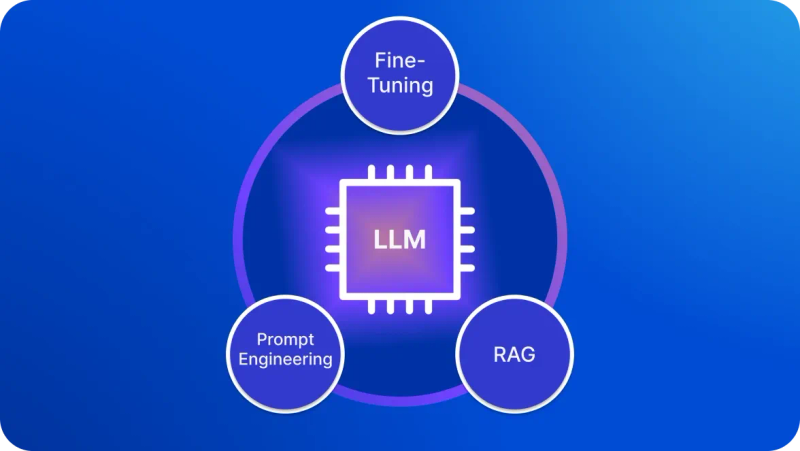
A general-purpose Large Language Model (LLM) is trained on vast amounts of publicly available text, not on your organization's actual policies, salary bands, or open roles. Ask it about your benefits, and it will generate a confident, completely wrong answer – a hallucination, which in HR can mean bad legal or compliance guidance.
This is the exact problem RAG solves: it searches your internal documents before generating a response, grounding the answer in what it actually found.
RAG isn't the only way to ground a model in your data. For a breakdown of how it stacks up against fine-tuning and prompt engineering, see RAG vs Fine-Tuning vs Prompt Engineering: Who Is the Winner?
The full HR AI implementation stack
That search step in RAG doesn't happen in a vacuum – it runs on an AI development stack with five layers, each doing one part of the job:
- Data layer – your HR records, policy documents, and applicant data, cleaned and broken into searchable pieces. This is the library RAG searches.
- Embedding + vector store – documents converted into a format that captures meaning, not just keywords, to find the right information even without that exact wording.
- Orchestration layer – runs the search, builds the prompt with the retrieved context, and routes the response, including when to escalate to a human.
- AI integration layer – puts your solution inside Slack, Teams, or your HR portal, so employees actually use it instead of needing a separate tool.
- Security layer – keeps access role-based and every query logged, so sensitive HR data stays restricted and auditable.
What it actually takes to implement generative AI in HR
Step 1: Assess your readiness before spending anything
Before you sign anything, ask a few honest questions first.
- Can your systems actually export clean data, and do you have a way to plug AI into your existing HR tools?
- Are your policy documents organized enough to be searched in the first place?
- Does your team know enough to catch the AI when it gets something wrong?
- And who's actually responsible for deciding what it's allowed to do, given whatever GDPR or your industry requires?
Step 2: Pilot one high-ROI, low-risk use case
Start smaller than feels comfortable. A policy Q&A chatbot is usually the right place to begin – people use it right away, so you get real feedback fast, and a wrong answer there costs a lot less than one from a recruiting or compensation tool would. Give it 90 days, and figure out what counts as success before you start.
Step 3: Expand across the employee lifecycle
Once the pilot proves itself, expand into the areas it naturally connects to. An HR policy chatbot connects readily to onboarding support. Onboarding data feeds into early performance signals. Performance management insights connect to learning and development recommendations.
At this stage, the AI layer needs access to more of your organizational data. Integrating it with your HR information system, your recruiting software, and your learning platform makes responses accurate and relevant rather than generic.
Step 4: Scale toward agentic AI
The next evolution is AI that takes actions rather than just answering questions. According to Gartner, 82% of HR leaders plan agentic AI deployment within the next 12 months – systems that schedule interviews without being asked, trigger onboarding tasks as each step completes, and flag disengagement to a manager.
Plan for governance and change management to take at least 12 months to mature, growing alongside the technology rather than trailing behind it.
The risks of generative AI in human resources you cannot ignore
- Bias in HR AI. Data reflecting old hiring patterns can make the system favor the same kinds of candidates, just faster, so outputs need regular fairness checks.
- Data privacy. HR holds some of the most sensitive information in the company, so the AI should only see what each question needs, with everything encrypted and access restricted by role.
- Transparency. People don't like feeling watched, even by something meant to help them, so employees need to know where AI is involved, with a human kept in the loop before launch.
- Governance. Without clear ownership, problems quietly pile up, so legal and IT need to sit alongside HR, with a person required to sign off on anything high-stakes like pay.
Need a partner?
Building AI for HR that works in production requires deep expertise in AI architecture, data privacy compliance, and the specific integration challenges of HR systems. DigitalSuits has delivered end-to-end HR AI implementation projects and offers generative AI consulting and generative AI integration services purpose-built for the data sensitivity and governance requirements of HR. Contact us to get a competitive advantage for your business with the right AI solution.
Written by
 Anastasiia MoskvichovaContent Marketing Specialist
Anastasiia is an enthusiastic content writer who diligently researches and curates valuable information to craft engaging content tailored for readers with a keen interest in marketing, sales, and technology.
Was this helpful?
0No comments yet