

What is a product detail page?
A product details page is a web page specific to ecommerce websites that reveals all the necessary information about a single product. Every online store has a number of product pages for each item in its catalog.
Why is the product detail page important?
- PDPs are places where customers make their purchase decisions based on the information included.
- Often, users arrive at PDPs when searching for a specific product on Google. In such cases, PDPs form the first impression, and this impacts the user's further steps.
- PDP helps merchants build trust with their customers through social proof signals and communicate brand identity using consistent designs.
- The quality of the information on PDPs influences churn rates, customer complaints, and product returns. The more comprehensive your PDP is, the better metrics you’ll get.
What are the components of a product details page?
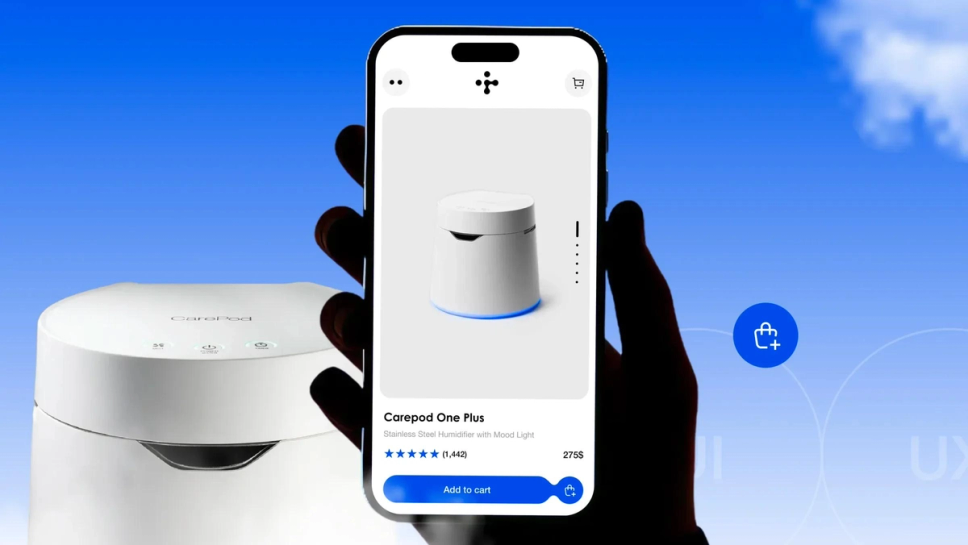
- Product title and description: This is the main part of the PDP, which includes full information about the product, its features, materials, and benefits.
- Product images/videos: Images and videos are displayed after the title and description, showcasing your product. It’s recommended to show your products from different angles using high-quality media content.
- Price: The product’s pricing should be clearly visible, as it’s among the top priorities for a customer. This section may also include discounts and information about payment options, such as Buy Now Pay Later (BNPL).
- Availability status: Your customers should be able to see if a product is in or out of stock. If a product is unavailable at the moment, you can add a ‘Notify me’ button for customers to receive updates when the product is back in stock.
- Reviews: A customer review section is a must-have for a PDP if you want to positively influence purchase decisions. Reviews typically include ratings and client feedback about the previously purchased products.
- Call to action: CTAs, such as ‘Buy Now,’ are typically placed next to the product price. This button should have a contrast color and a clear message to add a product to the cart.
- Additional product details: If necessary, PDP can include technical specifications or additional information specific to some products.
- Return policies: You can add badges that briefly inform your customers about the refund policy, such as ‘Free returns within 15 days’.
- Fulfillment options: This section includes shipping information and delivery timelines.
- Navigation: PDP, like other pages on your store, should have a search bar, navigation menu, and breadcrumbs to enable customers to easily navigate between pages.
- FAQs and chatbots: Optionally, you can add FAQ and chatbots to product pages to ensure that your customers can find answers to their questions regarding the desired item.
Check our article on how to build a high-converting Shopify product page for more insights and real-world examples.
Best product detail page practices
To keep users engaged with your PDP and nudge them to complete a purchase, it’s best to follow the best PDP practices.
- Ensure high loading speed. Utilize smart caching strategies, such as lazy loading, to optimize your store's speed, which is crucial for achieving high conversion rates.
- Keep your PDP concise. Make sure that your PDP is not cluttered with too many elements and includes only the necessary information.
- Offer product recommendations. To keep your customers engaged and boost your AOV, add sections with similar or supplementary products.
- Provide social proof. Add trust badges that guarantee product quality and payment security on your website.
- Guarantee transparency. Ensure that customers clearly see refund information, pricing, and shipping policy before checkout to eliminate surprises at the final stage of the customer journey.