










To improve your store's user experience and performance, you need to know whether your users actually have problems accessing and navigating your website. Core Web Vitals by Google is what provides you with insights into your performance gaps.
Here, we discuss what these metrics are all about and how to improve Shopify Core Web Vitals in the shortest possible terms for better store visibility and user experience.
TL;DR: Exploring Core Web Vitals for Shopify stores
Core Web Vitals are three key Google metrics for evaluating a website's user experience, and, at the same time, they are ranking factors.
- Largest Contentful Paint (LCP) measures loading speed.
- Interaction To Next Paint (INP) measures website interactivity.
- Cumulative Layout Shift (CLS) measures visual stability.
Tools for tracking Shopify Core Web Vitals include:
- Shopify Analytics
- Google Search Console
- PageSpeed Insights
- Lighthouse
Techniques to improve Shopify Core Web Vitals:
- For LCP enhancement, optimize image formats, enable lazy-loading for everything except the main LCP asset, and prioritize fetching this asset.
- To improve INP, check your thread for long-running tasks to optimize them, minimize apps, and delay non-critical scripts.
- To optimize CLS, reserve space for images and dynamic content that appear over time, and avoid apps that inject content on top of the loaded pages.
What are Core Web Vitals?
Core Web Vitals are main metrics that Google uses to assess website speed and the overall user experience health. These metrics' level directly influences website position in the Google search, since they're official ranking factors since 2021.
Google analyzes high-traffic pages like the homepage individually, while pages with low traffic but similar layouts like blog posts are grouped and assessed together.
If your website is new and loads quickly, Google will give your new pages the ranking advantage. And if two websites have equally good content, Google will always rank the one with better Core Web Vitals higher.
Let's see how it works in practice. Imagine you visit a store and have to wait for product images to load for some time. When they're finally visible, and you're about to click a Buy button, it suddenly shifts, since a pop-up appears moving the page elements down. After you close a pop-up and click the button, you again spend a few minutes until landing in a cart. Such an experience could be quite annoying, and Google knows it (thanks to Core Web Vitals), pushing such websites down in search results.
Let's explore every Core Web Vitals metric in more detail.
Core Web Vitals metrics
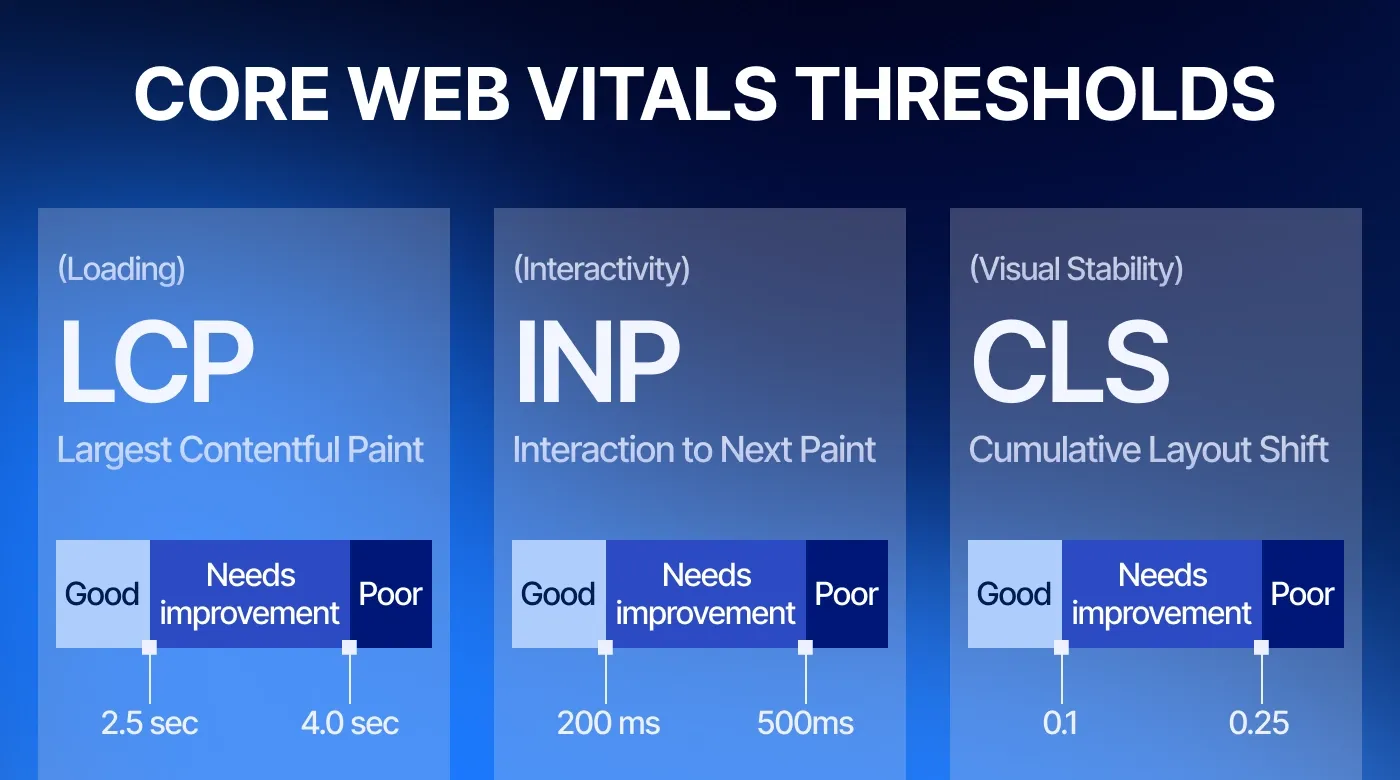
Largest Contentful Paint (LCP) measures loading performance. It shows how quickly the main content of a web page loads. Why is it important for user experience? Once a user sees the content, they can evaluate if the webpage is useful and make a decision about their next actions. From the technical point of view, LCP reports the time for the largest image, text, or video to become visible. A good LCP is 2.5 seconds or less.
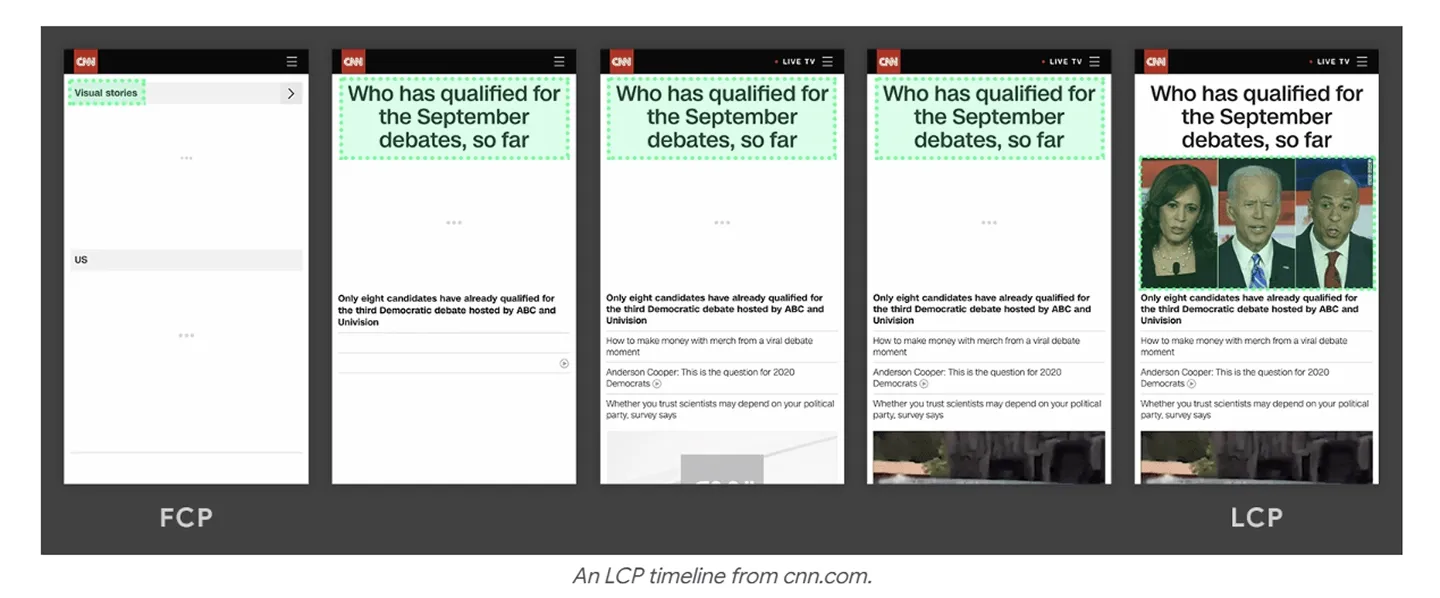
An example of how LCP is measured.
Interaction To Next Paint (INP) measures page interactivity or its overall responsiveness. It shows the level of latency for interactions across the webpage, such as clicks, taps, and text events. Why does it matter? If a user is stuck at some point, unable to open a tab, this may ruin the UX. For most websites, an interaction with the longest latency is reported as INP. A good INP is 200 milliseconds or less.
Compare poor and good responsiveness.
Cumulative Layout Shift (CLS) measures webpage visual stability. It shows if unexpected movements of page elements occur. Why does it matter? From the user's end, such shifts may occur when some elements, such as ads or images, are added to the page before the existing content, making user actions problematic. Technically, CLS measures the largest burst in layout shift scores during the page lifecycle. A good CLS is 0.1 or less.
An example of a page shift that leads to UX issues.
How to track Core Web Vitals for your Shopify stores?
To evaluate user experience health in your store, you can check Shopify Core Web Vitals with multiple services, including your Shopify admin.
To check Core Web Vitals in the Shopify dashboard, go to Analytics → Reports, and enter the required metric's name in the search bar. For each metric, you can check statistics for a specific URL, for a page type, and see data over time.
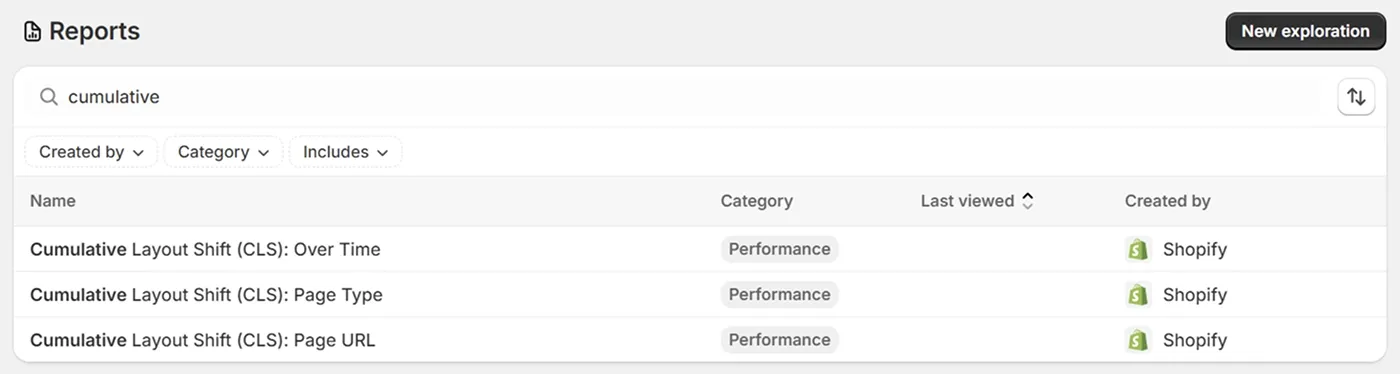
Filtered CLS statistics in the Shopify reports.
In your website's Google Search Console, go to Experience → Core Web Vitals to see statistics over time for desktop and mobile.
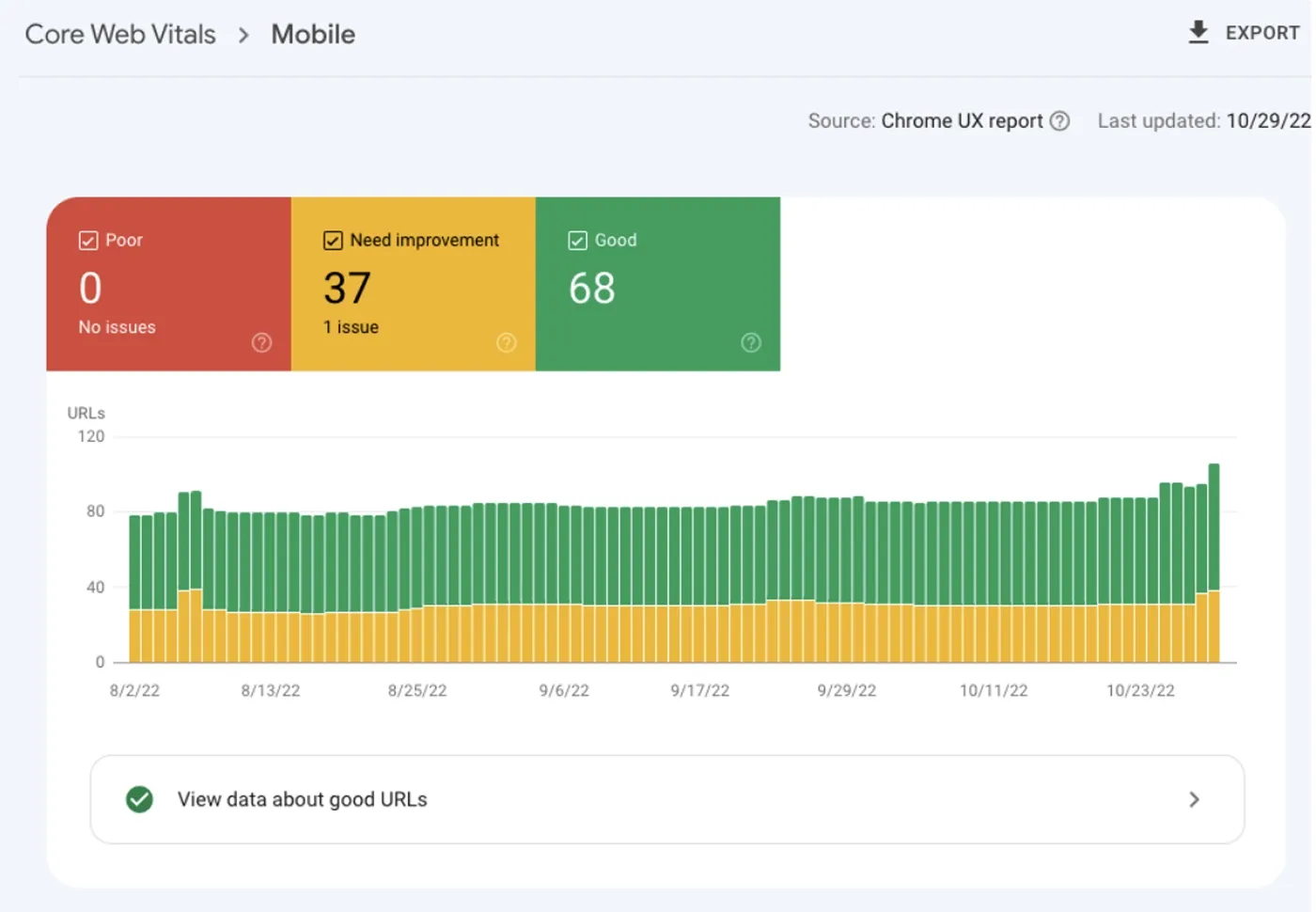
An example of Core Web Vitals statistics in Google Search Console.
PageSpeed Insights is a Google service that lets you check Shopify Core Web Vitals and additional metrics, such as First Contentful Paint (FCP) and Time to First Byte (TTFB), for a specific URL.
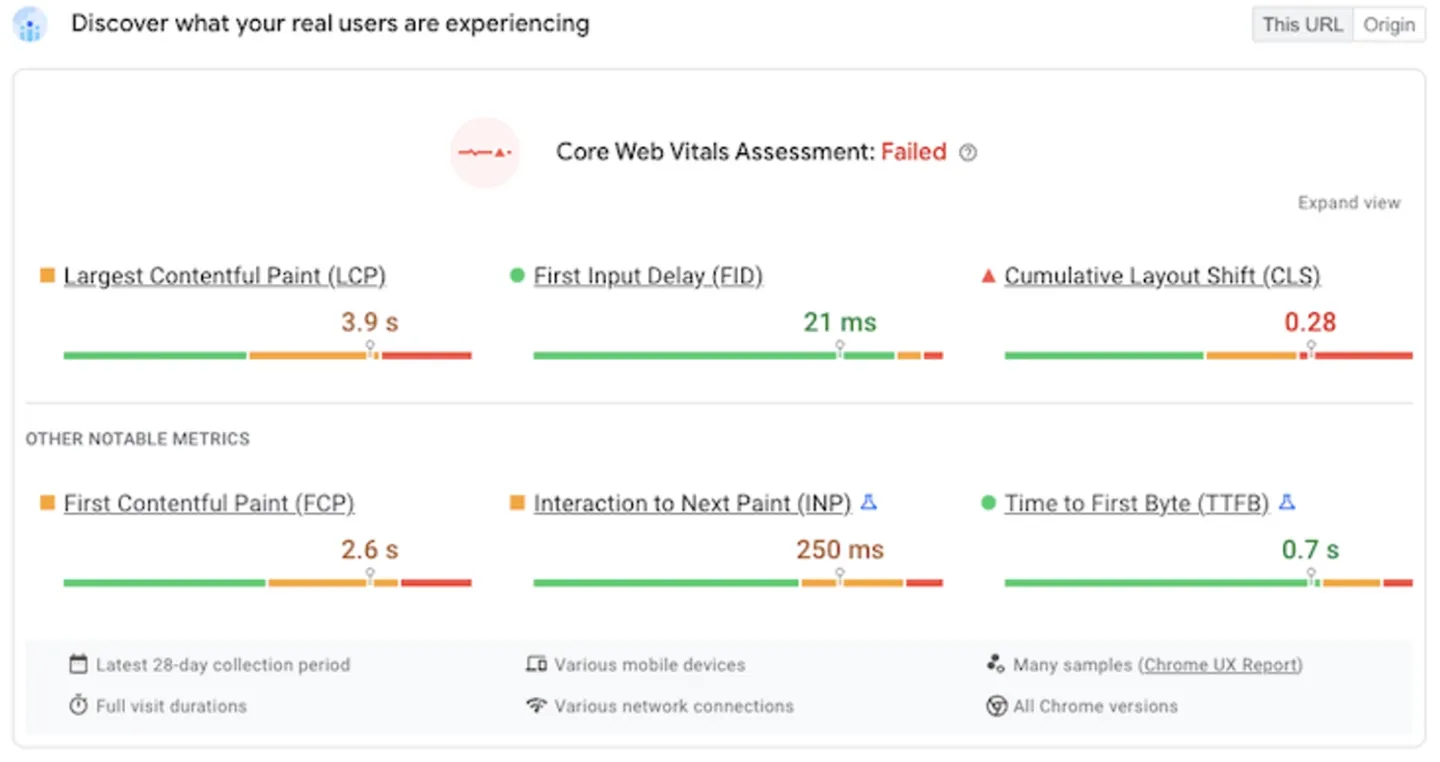
An example of Core Web Vitals statistics with PageSpeed Insights.
Lighthouse is a developer tool that helps monitor store performance. It's available in Chrome DevTools and as a Chrome extension.
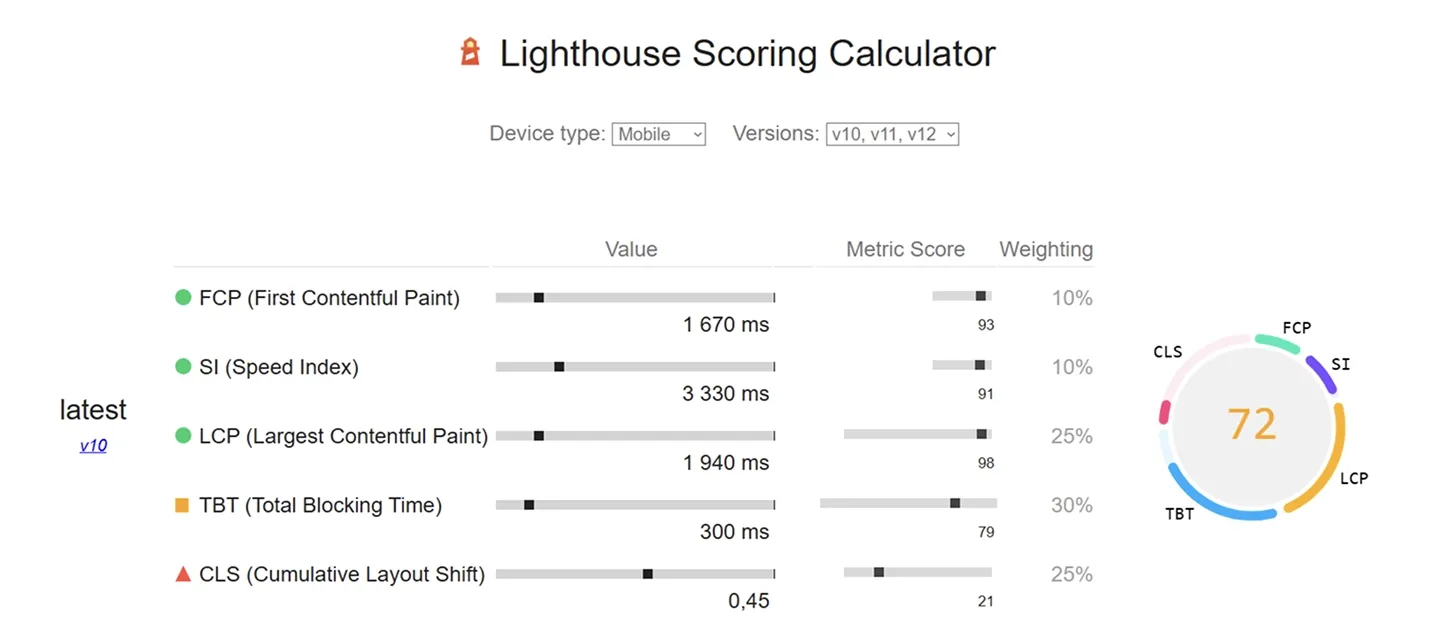
Lighthouse Scoring Calculator
Techniques to improve the Core Web Vitals score on a Shopify store
Shopify store owners often struggle to improve Core Web Vitals scores. We've compiled a list of actionable store optimization tips to boost CWV score on your Shopify store based on the DigitalSuits Shopify developers' experience and best practices they use in their work.
Most of them require some technical expertise. If you need help implementing the optimization techniques, get in touch with us. We provide Shopify speed optimization services and effectively improve user experience, which is proven by numerous successful projects.
Tips for improving Largest Contentful Paint (LCP) for a Shopify store
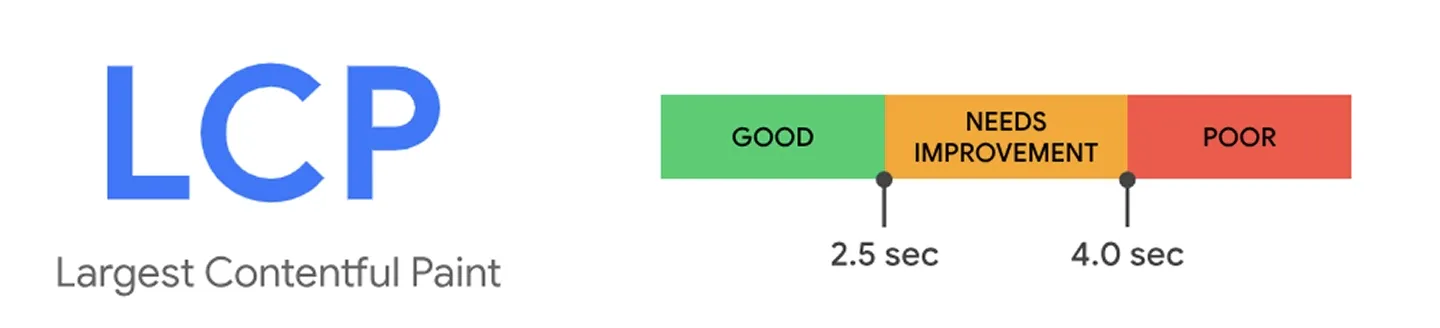
To improve this metric, start by finding the pages with the worst LCP. Then, identify the current problems and utilize the best practices to eliminate them.
Optimize image formats. Shopify now supports AVIF, which is even smaller than WebP. Use the image_tag Liquid filter to let Shopify automatically serve the best format.
Disable lazy-loading for the first element. The LCP element is typically your hero image or the first product image. If it's waiting for a user scroll to be loaded, this will spike your LCP. So, your first section's image should have the loading= eager tag to not damage LCP.
Enable lazy loading for everything else. Your pages load faster if the elements that follow a hero banner are loaded as users scroll them down. Shopify pre-built themes typically ensure lazy loading automatically using loading= lazy for sections further down the page. Still, check if it's true for your theme.
Prioritize fetch. Use the attribute fetchpriority=high on your LCP image to tell the browser this is the most important asset on the page.
How to improve Interaction to Next Paint (INP) for a Shopify store
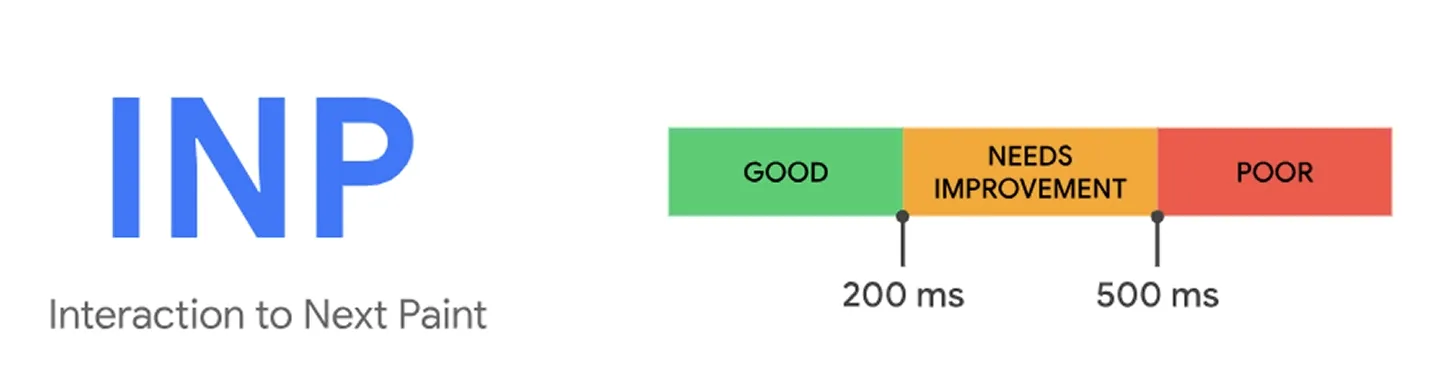
Before fixing interactivity issues, you first need to identify where and why they occur with tools like Lighthouse. Following some common rules will be helpful.
Check the thread for long-running tasks. If some task runs longer than 50-100 ms, it could be a signal to rewrite its logic by splitting it into smaller chunks so as not to block other processes. For instance, long tasks, such as complex filters, may delay the execution of the 'Add to cart' click. The click won't register until the task is finished.
Run app audit. Every app adds JavaScript, which is a heavy load to the main thread. Uninstall any app you aren't using regularly. Check your theme.liquid for 'ghost code' left behind by uninstalled apps. To replace necessary but heavy apps, use Shopify's native features or custom high-quality code.
Delay non-critical scripts. Use the defer or async attributes for third-party scripts, such as heatmaps and chat widgets, to move them down the page so they don't stop the critical elements from being interactive.
Tips to optimize Cumulative Layout Shift (CLS) for a Shopify store
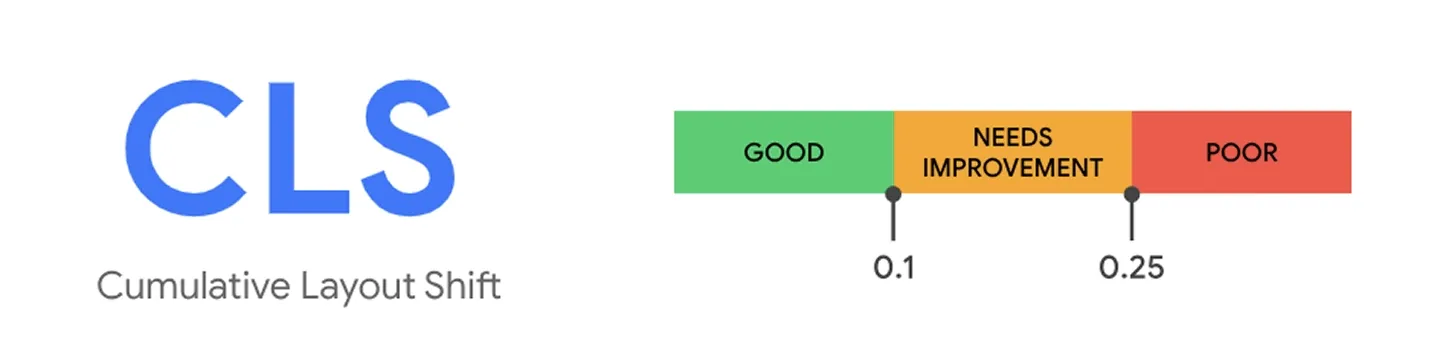
CLS optimization also requires a prior check of elements that cause layout shifts. What are the most common practices to eliminate CLS issues?
Set image dimensions. Define width and height in your img tags. This tells the browser to reserve that space even before the image downloads.
Reserve space for dynamic content. If you have an announcement bar or a 'Product recommendations' section that pops in late, use CSS to set a min-height so the rest of the page doesn't get pushed down when it appears.
Avoid content injections. Don't use apps that inject banners or pop-ups at the top of the page after it has loaded. Move these to the bottom or use a fixed-height container.
The bottom line
Improving Core Web Vitals on Shopify is not only an important SEO tactic but also a way to enhance your overall website user-friendliness. To sum up the recommendations, your optimization plan may look like this:
- Get insights about your current Core Web Vitals scores using tools such as PageSpeed Insights and Lighthouse.
- Check how CWV on Shopify has changed since the last known period, which metric has moved, and which device has issues.
- Choose pages that have the most impact first, such as the homepage and collections.
- Run the page analysis on both desktop and mobile and document any issues.
- To improve LCP, set high priority for the main content to be shown first on a page, enable lazy-loading for the rest of the content, and set optimal image formats.
- For better INP, optimize your theme by reducing the number of apps, deferring scripts, and editing long-running tasks.
- To optimize CLS, reserve space for images and dynamic content that pop up late and avoid using apps that add elements on top of the loaded pages.
These are common recommendations to optimize Core Web Vitals on Shopify. In real-world scenarios, you might need more profound techniques to fix your specific issues. If you face challenges with keeping your store up and running with the green Core Web Vitals, contact the DigitalSuits team. Our specialists have expertise and professional tools to optimize your store and make every element work in balance, delivering a perfect user experience.
Frequently asked questions
Why is my LCP higher on mobile than on desktop?
Mobile devices have limited processing power and poorer networks than desktops. So, large images and fonts typically load more slowly on mobile, which can boost LCP. To optimize your store, you need to monitor LCP and other CWV on Shopify separately for desktop and mobile, identify their specific issues, and implement relevant changes.
Should I use an app for lazy loading?
If you use a Shopify 2.0 theme, such as Dawn, lazy loading is already built in. If your theme doesn't have such a feature for some reason, it would be better to implement it with custom coding rather than with a third-party app to prevent overloads. With the DigitalSuits team, you can migrate to Shopify 2.0 or benefit from Shopify integration services to add missing functionality. Let's discuss your requirements.
How often should I check my Core Web Vitals?
The basic recommendation is to monitor your Core Web Vitals on a monthly basis. However, if you plan big sales like Black Friday, check the metrics in advance to ensure your website works smoothly on the date.
You should also monitor Core Web Vitals for Shopify stores once you roll out website changes, such as adding a new app or a custom feature, to make sure they don't break your user experience.
If you're seeking to improve Google Core Web Vitals of your Shopify store with professionals, contact our team.

Written by
Anastasiia Moskvichova
Content Marketing Specialist
Anastasiia is an enthusiastic content writer who diligently researches and curates valuable information to craft engaging content tailored for readers with a keen interest in marketing, sales, and technology.












Was this helpful?
0
No comments yet