











In January 2026, the Shopify team released numerous improvements and new features across multiple categories to help merchants take advantage of enhanced functionality. In our regular digest, we review all updates and describe what they are about to help you make sense of them faster and get the benefit for your business.
An easier way to match Shopify Payments payouts with bank deposits
Shopify Flow now uses version 2026-01 of the GraphQL Admin API

Payments and web performance data are available in Sidekick
You can now create and edit reports using prompts in Sidekick.
To customize an existing report:
Go to Analytics → Reports,
Click the name of the report you want to customize,
In the Refine Query field, type your request in plain language.
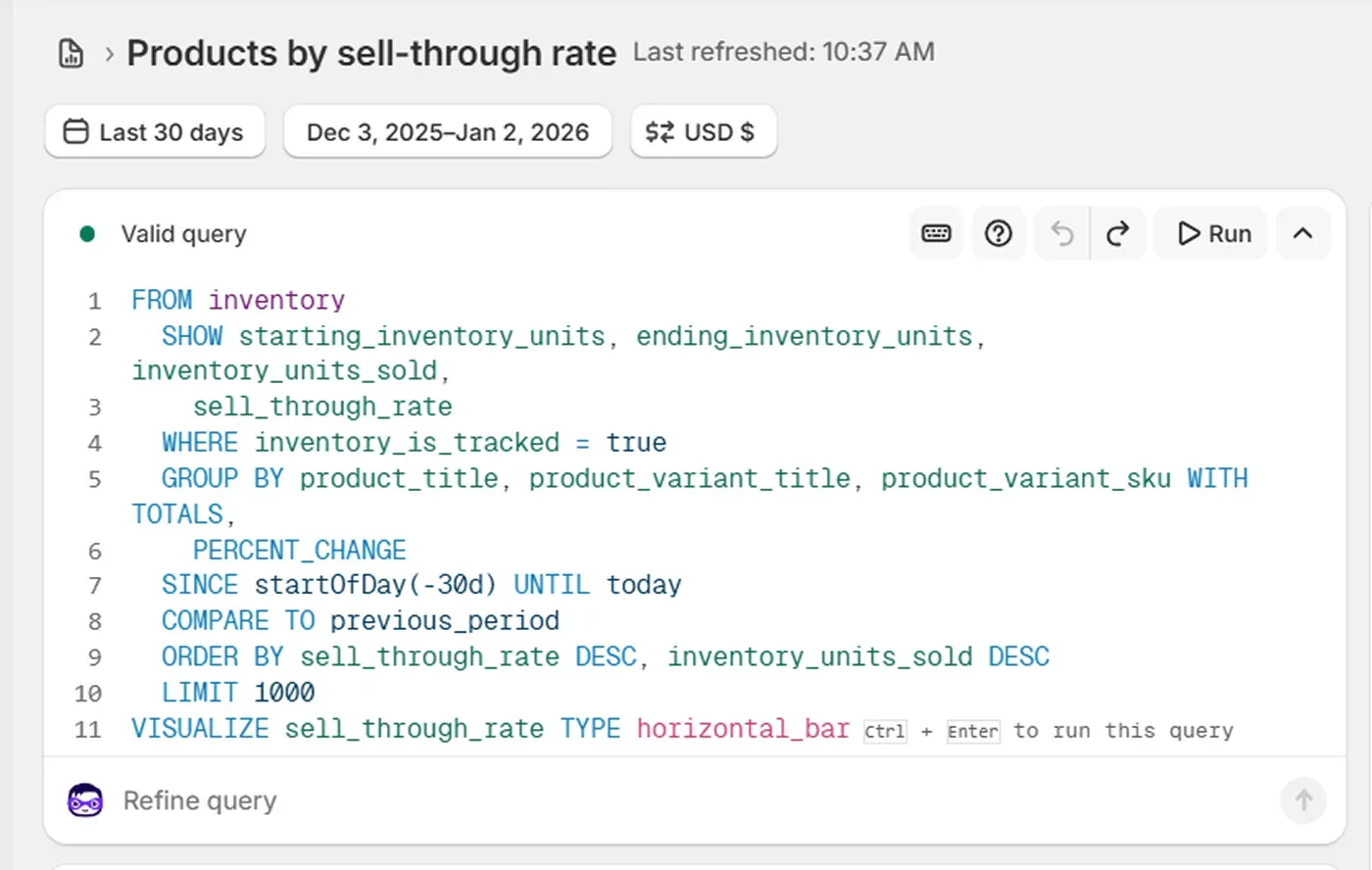
After you finish customizing, click Save As, enter the report name, and save a copy.
If you want to generate a new data exploration with Sidekick, follow these steps:
Go to Analytics → Reports,
Click New exploration,
In the What do you want to explore? field, type your request in plain language like "Show me fulfillment times by carrier."
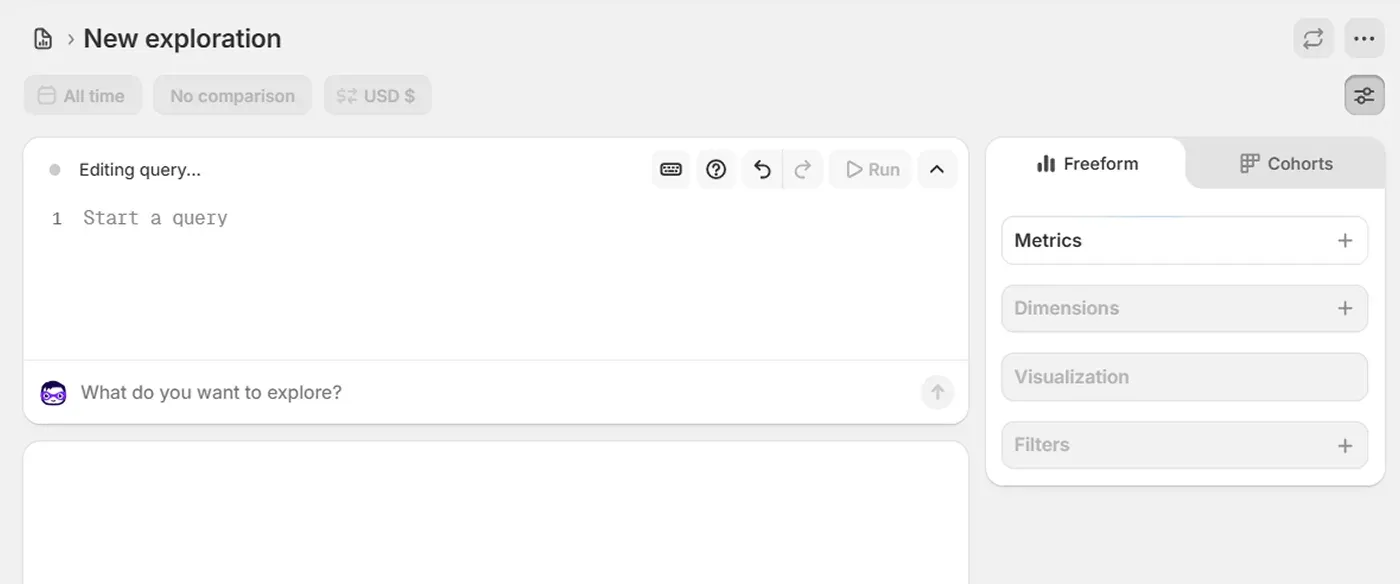
You continue customizing your reports with prompts in the Refine query field.
Once the report is ready, click Save.
In case you're interested in implementing AI tools but not sure which solutions are the most beneficial, learn more about the latest AI in ecommerce trends. And if you're looking for AI solutions built specifically for Shopify, read our article – Top AI Tools For Shopify – Free and Paid.
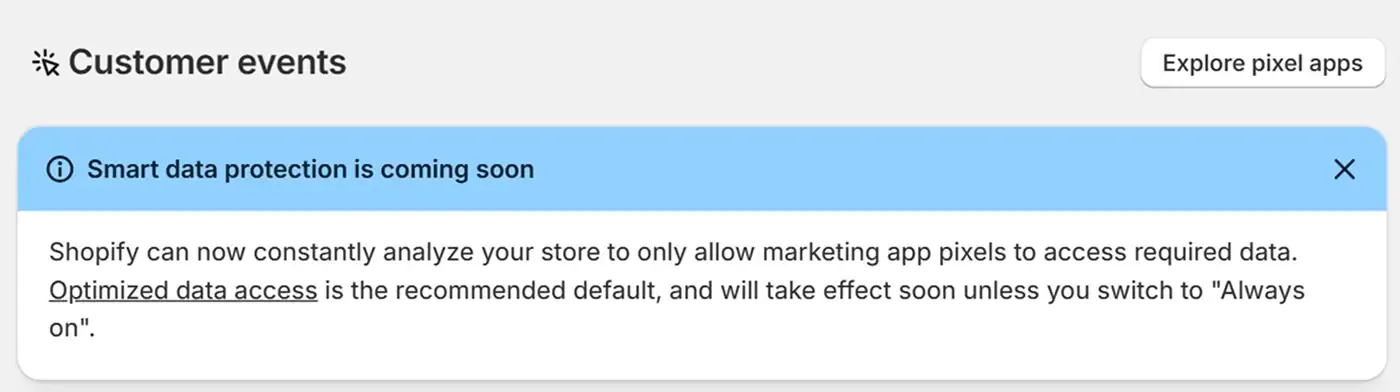
New settings to avoid pixel data oversharing
The smart marketing data protection feature is coming soon and will be available in your admin by default. This new feature helps you limit sharing data with marketing services via pixels if they haven't sent traffic to your website for some time. Shopify analyzes pixels and automatically pauses those with zero signals. If you don't want to limit data sharing, you can activate 'always on' mode in Settings → Customer events.
Improved business details management
In the General settings, Shopify updated the Business details section to make it easier to keep information up to date. The Billing address section is renamed to Store address to better reflect its purpose. This doesn't change how the address is used. Store currency now depends on the business country displayed in the Business details. If you want to make changes to any of these, you need to deactivate Shopify Payment and Shopify Capital first.
Change due calculator for cash payments
When a customer pays in cash with a quick sale, you can now use a calculator to see the change due. The calculator also supports cash rounding for markets with small coin denominations.
How to use the calculator:
Start a cash sale in a quick sale.
Enter the amount a customer gives you.
See the change due.
The change amount appears on the receipt and order confirmation.

Bulgarian Lev is changed to Euro
Starting January 1, 2026, Bulgaria changed its official currency from Bulgarian Lev to Euro. So, the markets that previously used the Bulgarian Lev will switch to Euro, and customers will now pay in Euros. If your store doesn't use Shopify Markets and multi-currency but has Bulgarian Lev as a default currency, you need to update it to Euro.
See more details about this change here.
More flexibility for inventory transfers
Inventory management is getting easier with the latest updates:
You can now edit shipments at any time, adjusting items and correcting mistakes, even when a shipment is in transit or has been received.
The Transfer Update API no longer requires both an origin and a destination for inventory, so you can leave the origin blank to record stocks from outside Shopify.
The reduced API restrictions also enable you to discard or send inventory to places Shopify doesn't track, such as third-party warehouses and suppliers, by leaving the destination blank.
Every change made appears in your adjustment history.
An easier way to match Shopify Payments payouts with bank deposits
Merchants who use Shopify Payments can now easily confirm payout exports using Bank Reference. You can also see which transactions were included in each payout with the Payout ID.
Updates on how Shopify handles Liquid code
Starting January 13, 2026, Shopify updates its approach to handling Liquid code in themes to make it more reliable. No actions are required on your part, as everything happens in the background and updates are automatic. You may notice comments in files explaining the updates, but the store's functionality will remain the same.
Category-specific return reasons for better insights
Shopify now suggests return reasons for users based on which items were returned, so you can get deeper insights into how to improve your products and services. These suggestions are available in the Shopify admin, POS, and Shopify self-serve returns. Using them can reduce return rates and help you make informed decisions about product and inventory development.
Sending emails with the sender email address using Flow
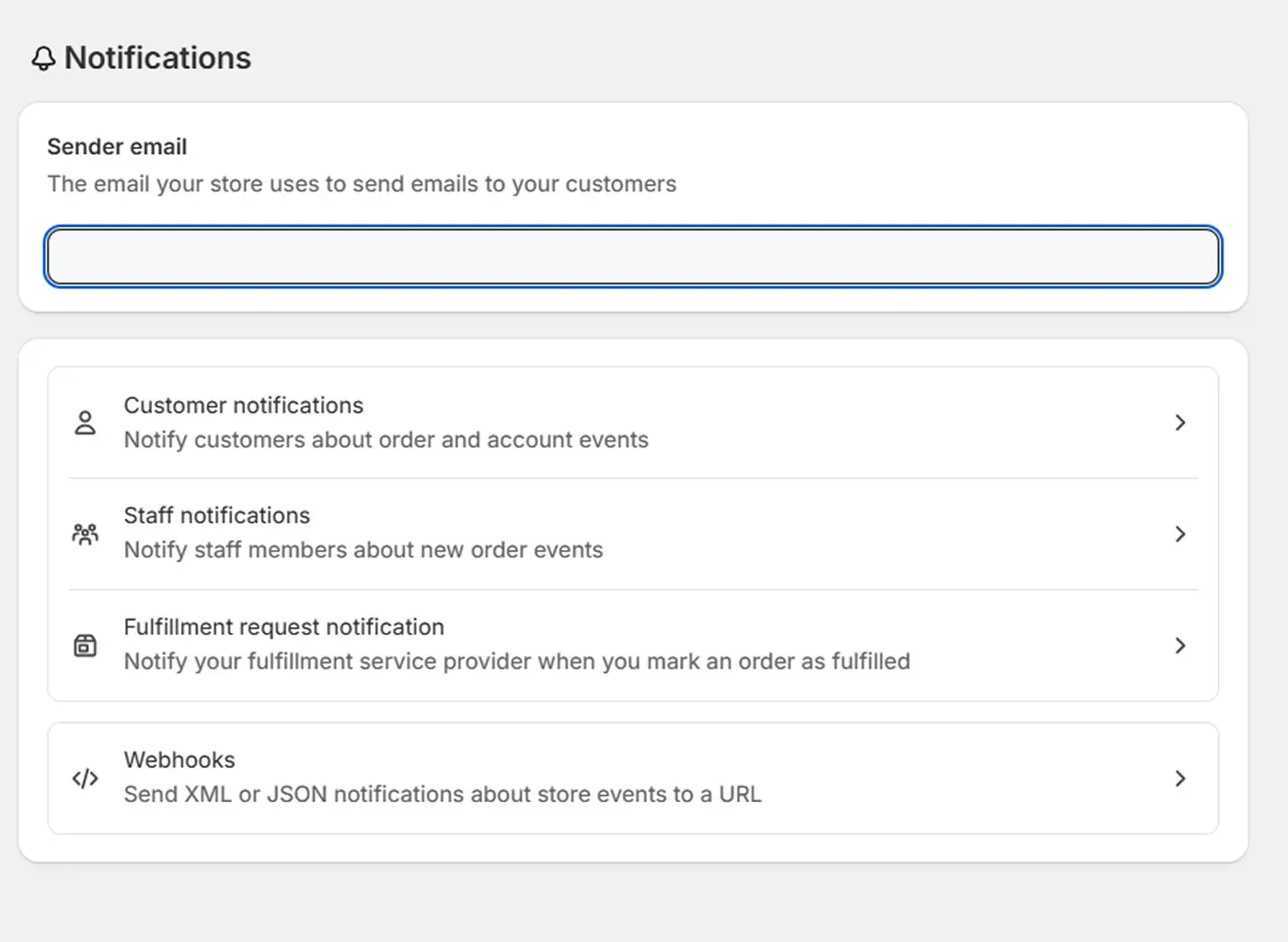
The Send internal email action in Shopify Flow will display your store's sender email address in the Form field. To ensure your emails are sent correctly, go to Settings → Notifications in your Shopify admin and verify that your information is properly configured.
Shopify Flow now uses version 2026-01 of the GraphQL Admin API
With the new GraphQL Admin API version, Shopify Flow has more options for building automations.
Advanced querying of metafields and metaobjects
Access to transactions on the Return object
New ReturnReasonDefinition for managing returns
orderUpdate mutation now includes phone field
See more information about GraphQL Admin API and Shopify Flow.
Updated chargeback rate calculation
Starting January 28, Shopify updates chargeback rate calculation across admin, analytics, notifications, and more, to provide a more consistent understanding of chargeback risks. What has changed? The chargeback rate metric now includes all disputes, including those resolved through programs like Visa's Rapid Dispute Resolution (RDR). There is also the RDR filter that lets you see information with and without RDR. These changes enable you to monitor chargeback risks more accurately and take action before chargebacks impact your business.
Offline payments for multi-entity
Shopify added offline payment support to multi-entity Shopify Payment setups to manage transactions across all offline stores, even when there is no internet connection. Transaction limits are automatic, so you don't need to configure every operational entity.
Fulfilling transfers with Shopify POS
Shopify POS 10.20 includes a complete inventory transfer workflow, allowing retail staff to fulfill and receive inventory transfers between locations without relying on Shopify apps or Admin.
Which updates are included?
Headquarters can assign transfers in Admin, while retail staff can pick, pack, and send transfers right from the POS.
Outgoing transfers are under the Orders tab, and incoming transfers are under the Products tab in POS.
Staff can scan, verify, and track transfers right from the sales floor.
User permissions let you choose which staff members can manage transfers.
Retail location classification
The Shopify team added a physical storefront toggle to Locations in Shopify Admin to separate customer-facing stores from POS-only locations, such as pop-ups or warehouses. This improves location discovery in the Shop app and ensures more accurate reporting. The location name in Shop will match the one in Admin.
If you need any help implementing Shopify features and updates, don't hesitate to contact the DigitalSuits team. We're a certified Shopify Plus Partner and have robust expertise in Shopify web development, working with clients across industries to build, optimize, and enhance their stores and business processes for long-term success.

Written by
Anastasiia Moskvichova
Content Marketing Specialist
Anastasiia is an enthusiastic content writer who diligently researches and curates valuable information to craft engaging content tailored for readers with a keen interest in marketing, sales, and technology.











Was this helpful?
0
No comments yet